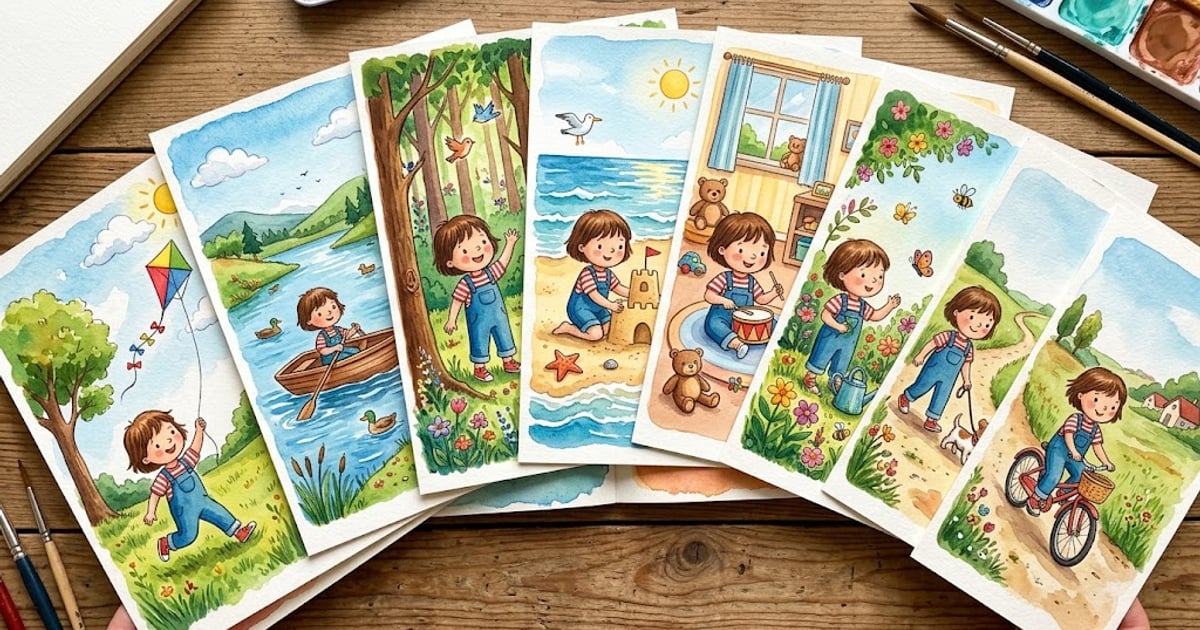
Your child's face changes on every page. That's the single biggest complaint parents have about AI-generated picture books — and it's the hardest problem to solve. Page one shows a brown-haired girl with round cheeks. Page five, she's got a narrower face and lighter hair. By page twelve, she barely looks like the same kid.
This isn't a bug. It's how AI image generation fundamentally works. And solving it — making a character look the same across 10, 15, or 20 pages — is the defining technical challenge in AI children's books today.
Here's how it works, why it's so difficult, and what StoryPic does differently.
Key Takeaways
- Each page in an AI picture book is generated independently — there's no built-in "memory" connecting one illustration to the next
- Character consistency requires anchoring every page generation to a reference image, not just a text description
- Style consistency (watercolor stays watercolor) and character consistency (the child looks the same) are two separate problems solved with different techniques
- Photo quality directly affects consistency — clear, front-facing photos with good lighting produce the best results across all pages
- StoryPic processes your child's photo through AI character recognition and uses a CHAR_ tagging system to embed references into every page generation
The Core Problem: Why AI Characters Keep Changing
Think of AI image generation like hiring a different artist for every page of a book. You describe the character — "a five-year-old girl with brown curly hair, green eyes, and a red dress" — and each artist draws their interpretation. Every one of them gets the broad strokes right. None of them draw the same girl.
That's essentially what happens with AI. Models like Stable Diffusion and Flux generate images from text prompts, but they have no concept of "the character I drew on the previous page." Each page is a blank slate. A fresh roll of the dice. The model interprets your text description from scratch every single time, and subtle variations — the curve of a jawline, the exact shade of hair, the spacing between the eyes — drift with each generation.
For a single image, this doesn't matter. For a 20-page picture book where a child needs to recognize themselves on every page? It's a dealbreaker.
The industry has tried several approaches to solve this. Some work. Most don't.
How Reference Images Change the Game
The breakthrough in character consistency came with reference image anchoring. Instead of relying solely on text descriptions — which are inherently imprecise — you give the AI an actual photo to work from.
Here's what happens when you upload a photo to a system that supports reference-based generation:
- Feature extraction: The AI analyzes the photo and identifies key facial features — eye shape, nose structure, face proportions, skin tone, hair color and texture
- Proportion mapping: Body proportions, height relative to other features, and build are captured
- Clothing and detail cataloging: What the person is wearing, distinctive accessories, or notable features get recorded
- Reference anchor creation: All of this gets compressed into a reference that can be fed into the image generation model alongside the text prompt for each page
The analogy here is useful: imagine giving every one of those different artists not just a written description, but a photo pinned to their drawing board. They'll still each have their own style, but the character will be recognizably the same person across all their drawings.
This is the difference between "brown curly hair" (which could be a thousand different children) and an actual reference showing this specific child's brown curly hair.
How StoryPic Handles Character Consistency
StoryPic's approach to character consistency is built on three layers that work together: character recognition from photos, a tagging system that embeds references into prompts, and consistent style enforcement across every page.
Step 1: Character Recognition from Photos
When you upload your child's photo to StoryPic, the AI doesn't just store the image. It runs the photo through a character recognition process that extracts a detailed description — facial structure, coloring, distinguishing features, expression tendencies, and body proportions. The reference image is processed through AI character recognition before any page is generated.
This extracted profile becomes the character's identity card. Every page generation starts with this profile, not a vague text description you typed in.
Step 2: The CHAR_ Tagging System
Here's where StoryPic's approach diverges from most competitors. The platform uses a CHAR_ tagging system that embeds character references directly into every image generation prompt. When the system generates page 7 of a story, the prompt doesn't just say "draw Emma playing in the park." It includes the full character reference tag — CHAR_ followed by the extracted description — so the AI model has the same reference anchor on page 7 that it had on page 1.
Think of it like a passport that travels with the character. No matter what scene the character is in — riding a dragon, exploring a forest, splashing in puddles — the CHAR_ tag ensures the AI starts from the same identity baseline every time.
Step 3: Style Enforcement Across Pages
Character consistency and style consistency are two separate problems, and StoryPic treats them that way. The CHAR_ tagging handles who the character is. A separate layer of prompt engineering handles the how — making sure that if you chose watercolor as your art style, every page looks like a watercolor painting, not just the first one.
StoryPic uses 55+ art styles with consistent character rendering across all of them. Whether you pick anime, oil painting, storybook classic, or paper cutout, the system maintains both the character's identity and the visual style across every page.
The Technical Challenge: No Memory Between Pages
Here's the part that surprises most people: each page is generated completely independently. There's no "memory" linking page 1 to page 10. The AI doesn't look at what it already drew and try to match it. Every single page is a standalone generation.
Each page generation takes 30 to 90 seconds, with the character reference anchored throughout. That means for a 20-page book, the AI reconstructs your child's appearance from the reference 20 separate times. It's like asking someone to draw the same person 20 times from the same photo — they'll get close every time, but there will be subtle variations.
This is why photo quality matters so much. A blurry, poorly lit photo gives the AI less to work with on each reconstruction. The reference anchor is weaker, and the variations between pages grow larger. A clear, well-lit, front-facing photo creates a strong anchor that minimizes drift across pages.
The challenge is a bit like maintaining continuity in a film with different cinematographers for each scene. Even with a comprehensive character bible and reference photos, each person brings small differences. The tighter the reference material, the less room there is for drift.
Style Consistency vs. Character Consistency
It's worth understanding why these are two distinct problems, because confusing them leads to frustration.
Style consistency means that if you choose watercolor, every page looks like watercolor. The brushstrokes, color palette, and overall aesthetic remain uniform. This is the easier problem. It's solved primarily through prompt engineering — giving the AI clear, consistent instructions about the visual style for every page. It's like telling those different artists "use watercolors, warm tones, loose brushstrokes." Most will produce visually cohesive results.
Character consistency means the child on page 3 is recognizably the same child on page 14. Same face shape, same eyes, same hair. This is the hard problem. Text descriptions alone can't capture the subtle geometry of a specific child's face. You need that reference image anchor.
Most AI book tools handle style consistency reasonably well. Very few handle character consistency at the level parents expect. It's the difference between "this looks like a watercolor book" (most tools can do this) and "this looks like my kid on every page" (much harder).
Why Competitors Struggle with This
The character consistency problem has split the market into three camps, each with a different trade-off.
The "Avoid It Entirely" Camp
Companies like Wonderbly and Hooray Heroes sidestep the problem by using pre-drawn avatar templates. You build a cartoon avatar — pick hair color, skin tone, eye shape — and that same static avatar appears on every page. Character consistency is perfect because there's no AI generation involved. The trade-off? The character doesn't actually look like your child. It looks like a cartoon approximation. And the illustrations are limited to whatever templates the company has designed.
The "Acknowledge It's Unsolved" Camp
Google's Gemini Storybook, launched in August 2025, is the highest-profile example. Google's own FAQ acknowledges that character consistency across pages is a known limitation. Each page generates a different interpretation of the character. For a free tool from a tech giant, the quality is impressive for single pages — but the consistency across a full book falls short of what parents expect when they see their child's face change from page to page.
The "Solve It with Reference Anchoring" Camp
This is where StoryPic sits. Rather than avoiding the problem or acknowledging it as unsolved, the platform attacks it directly with photo-based character recognition and the CHAR_ tagging system. The results aren't perfect — no AI system produces identical characters on every page — but the consistency is significantly higher than text-only approaches because every page generation starts from the same reference point.
For a deeper comparison of how different tools handle personalization, see our complete guide to AI children's books from photos.
Tips for Getting the Best Character Consistency
The quality of your results depends heavily on the input. Here are the factors that make the biggest difference.
1. Use a Clear, Front-Facing Photo
The AI needs to see your child's full face to build an accurate reference. Profile shots, partially obscured faces, or group photos where faces are small all reduce the quality of the character anchor. A straight-on headshot with both eyes, nose, and mouth clearly visible gives the AI the most to work with.
2. Good Lighting, Minimal Shadows
Harsh shadows across the face confuse the AI about facial structure. Even, natural light — near a window during daytime, for example — produces the cleanest reference. Avoid direct flash, which can wash out features, and heavily backlit photos where the face is in shadow.
3. Simple Background
A busy background makes it harder for the AI to isolate and focus on facial features. A plain wall, a clear sky, or any uncluttered backdrop helps the system zero in on what matters — your child's face and features.
4. Consistent Clothing Helps
If your child is wearing a distinctive outfit in the photo — a bright yellow raincoat, for instance — the AI will often incorporate that into the character reference. This can actually help consistency, because the clothing becomes another anchor point. If you want the character to wear something specific throughout the story, wearing it in the reference photo is the simplest way to achieve that.
5. Avoid Accessories That Obscure Features
Sunglasses, hats that cast shadows over the face, or face paint can all reduce the quality of the character extraction. If your child wears glasses regularly, include them — the AI will incorporate them. But anything that hides or distorts facial features will weaken the reference.
For more detail on preparing the perfect photo, check out our guide on turning your child's photo into a storybook character.
Where Character Consistency Is Heading
The current generation of reference-based tools represents the first real solution to the consistency problem, but the technology is evolving fast. Here's what's coming.
Multi-Angle Reference Support
Right now, most tools (including StoryPic) work from a single reference photo. The next step is accepting multiple photos from different angles — front, side profile, three-quarter view — to build a more complete 3D understanding of a character. This would reduce the variations that show up when a character is drawn from different angles across a story.
Video-to-Character
Instead of selecting the perfect photo, imagine simply pointing your phone camera at your child for a few seconds. The system would extract dozens of frames, capture the face from multiple angles and expressions, and build a richer character reference than any single photo could provide.
Real-Time Style Transfer
Future systems may allow you to change the art style of a completed book after generation — switching from watercolor to anime, for example — while maintaining perfect character consistency. The character reference would be style-agnostic, with the artistic style applied as a separate layer.
Cross-Book Character Persistence
Once a character is established in one book, they could carry over to new stories automatically. Your child's character would be saved as a persistent identity that works across unlimited stories, themes, and styles — no re-uploading, no re-extraction.
These advances won't arrive overnight, but the trajectory is clear: AI character consistency is getting better, faster, and more accessible. The gap between "AI-generated illustration" and "professional illustrator who knows your child" is closing.
See Character Consistency in Action
Upload a photo, pick a style, and watch your child appear consistently on every page. First story free.
Create Your Story Free →Frequently Asked Questions
Why does my child look different on some pages of an AI-generated book?
Each page is generated independently by the AI — there's no memory connecting one page to the next. The AI reconstructs your child's appearance from the reference on every single page, and small variations naturally occur with each reconstruction. This is similar to how two human artists drawing from the same photo would produce slightly different results. Using a clear, high-quality reference photo minimizes these variations. StoryPic's CHAR_ tagging system anchors every page to the same reference, which significantly reduces drift compared to text-only approaches.
What makes a good reference photo for character consistency?
The best reference photo is a clear, front-facing shot with even lighting and a simple background. Both eyes should be fully visible, and there shouldn't be heavy shadows across the face. Natural light near a window works well. Avoid sunglasses, face-obscuring hats, or heavy filters. If your child has a distinctive outfit you'd like in the story, wearing it in the reference photo helps the AI maintain that detail across pages. See our FAQ for more photo tips.
Is character consistency the same across all 55+ art styles?
Character consistency is strong across all 55+ art styles StoryPic offers, but some styles are inherently more forgiving than others. Realistic and semi-realistic styles show subtle variations more clearly because our eyes are trained to notice small differences in realistic faces. Illustrated styles like cartoon, anime, or paper cutout are more forgiving because the stylization itself smooths out minor variations. The CHAR_ reference anchoring works the same way regardless of style — the difference is in how noticeable small variations are to the human eye.
How is StoryPic's approach different from avatar-based tools?
Avatar-based tools like Wonderbly and Hooray Heroes have you build a cartoon character by selecting features — hair color, skin tone, eye shape — from a menu. The result is consistent across pages because it's the same pre-drawn template repeated, but it doesn't actually look like your child. StoryPic starts from a real photo and uses AI to generate illustrations that capture your child's actual appearance — their specific face shape, features, and proportions. The trade-off is that photo-based AI must solve the consistency challenge (which avatar tools avoid entirely), but the result is a character that parents and children actually recognize. Try it free to see the difference.
See Character Consistency in Action
Upload a photo, pick a style, and watch your child appear consistently on every page. First story free.
Create Your Story Free →